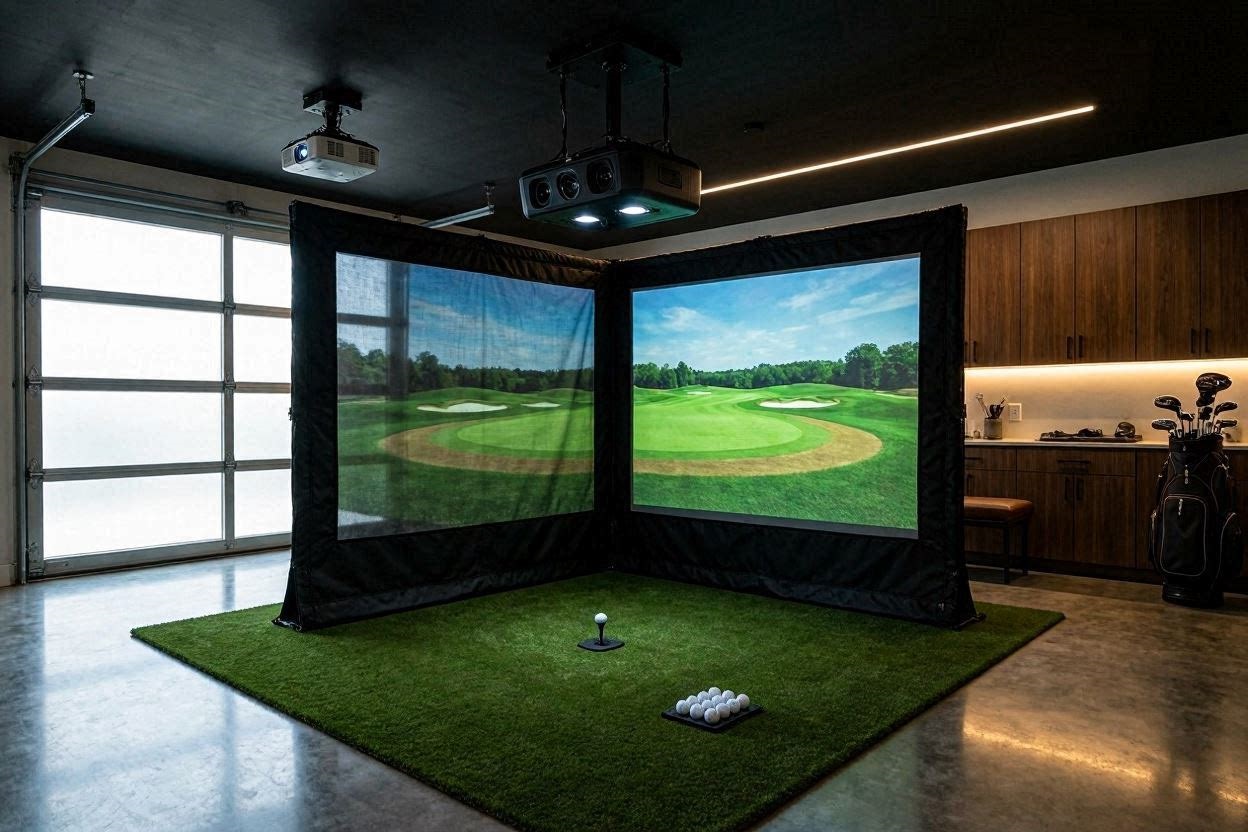
Transforming a standard residential garage into a premium indoor golf sanctuary is a major milestone for any dedicated golfer. Sweating over floor dimensions, clearing out years of family storage, and mapping out structural clearances culminates in a highly technical architecture where data accuracy reigns supreme. When configuring a high-ticket workspace for game improvement, moving from ground-based sensors to a permanent ceiling array alters your entire installation blueprint.
The execution of a high-performance ProTee VX garage simulator setup represents one of the most balanced approaches to premium indoor golf in 2026. Leveraging advanced high-speed machine vision instead of traditional down-range radar systems provides an incredibly immersive environment that renders ball flight instantaneously. However, combining an overhead optical sensor with a heavy-duty fabric enclosure and a dedicated short-throw projector requires balancing physical hardware constraints with precise digital calibrations. This deep-dive engineering review will analyze the hardware specifications, room clearing hurdles, and computing parameters required to optimize this specific configuration.
The Quick Answer / Key Takeaways
- Sensor Autonomy: The overhead optical sensor utilizes advanced machine vision to instantly calculate ball and club telemetry without requiring specialized marked golf balls or reflective clubhead stickers.
- Ceiling Metrics: Achieving optimal tracking accuracy requires a rigid ceiling height of 9 to 11 feet, with 10 feet serving as the ideal structural baseline to prevent accidental club strikes.
- Enclosure Footprint: Integrating a heavy-duty fabric shield ensures complete projectile containment while isolating the tracking zone from external ambient light pollution.
- Display Engineering: Utilizing a high-output, short-throw projector delivers crisp, clear immersion even when operating at a standard 1080p resolution matrix.
- Computing Infrastructure: Processing instant high-speed dual-camera data frames demands a dedicated gaming computer with robust graphics processing capabilities to prevent rendering latency.
Technical Hardware Architecture: The Machine Vision Core
To understand why this specific configuration functions so efficiently indoors, you must analyze the underlying physics of ceiling-mounted optical launch monitors. Traditional ground-based systems track ball flight from a lateral position, which can feel crowded to players who frequently host left-handed and right-handed guests. Shifting the sensor matrix directly above the hitting area completely opens up the floor space.
The technology chassis relies on an advanced array of high-speed smart cameras running proprietary vision software algorithms. Instead of projecting a radar field down the target line, these dual-camera lenses continuously capture the hitting area under a specialized light spectrum. The system identifies the exact coordinates of the ball cover dimples the microsecond the club face makes contact.
Because the system captures ball and club metrics simultaneously from an overhead perspective, it directly measures ball speed, launch angles, total spin rate, spin axis tilt, club path, and face orientation. The primary benefit of this camera system is its complete independence from specialty tracking substrates. You can pull any premium golf ball from your bag and strike it naturally without applying metallic stickers or high-contrast ink patterns.
Room Geometry and Space Clearing Hurdles
The physical volume of a residential garage serves as the absolute gatekeeper for a successful simulator installation. If your room dimensions do not meet the explicit structural requirements of your tracking unit and fabric enclosure, the system will experience data dropouts or unsafe playing conditions.
Optimizing the 10-Foot Ceiling Threshold
A 10-foot ceiling height is widely considered the gold standard for residential golf simulator design. At this height, players can swing extra-long drivers with complete confidence, free from the subconscious fear of striking drywall or damaging overhead joists. When installing a ceiling launch monitor, this vertical height provides the optimal focal window for the camera lenses.
If your garage ceiling drops below 9 feet, the field of view for overhead tracking systems narrows dramatically. This spatial limitation compresses your hitting zone, forcing you to position the ball within a highly restrictive physical box to guarantee camera registration. Conversely, if your ceilings extend past 11 feet, you must drop the tracking chassis down using reinforced steel extension tubes to bring the lenses back within their optimal target envelope.
Managing Lateral Space in Extended Garages
A common layout advantage in suburban residential properties is a garage bay that features an asymmetric side extension. Having an extra pocket of space that reaches past the standard tracks of your garage door creates the perfect architectural alcove for an immersive simulation bay. This lateral clearance allows you to center your hitting mat perfectly relative to the projection screen.
In narrow rooms, players are often forced to offset their tee position to the right or left to avoid hitting the side walls on their backswings. Offsetting your stance breaks the visual immersion because you are no longer aiming down the center of the virtual fairway displayed by your software. A room width of 14 feet or greater ensures that both left-handed and right-handed golfers can stand comfortably on a central axis, executing full swings without altering their natural mechanics.
Enclosure Integration: Structuring the Impact Zone
Containing golf balls launched at velocities exceeding 150 miles per hour requires an industrial-grade frame and an elite fabric impact face. The enclosure must balance cosmetic appeal with structural durability.
+-----------------------------------+-----------------------------------+
| Component Feature                 | Technical Specification Profile   |
+-----------------------------------+-----------------------------------+
| Launch Monitor Sensor Matrix      | Ceiling-Mounted Dual-Camera Tech  |
| Hitting Enclosure Dimensions      | Premium Multi-Layer Fabric Shield |
| Native Projector Resolution       | 1080p High-Output Short-Throw     |
| Hitting Surface Geometry          | Shock-Absorbing Modular Turf      |
| Software Simulation Engine        | GSPro Unreal Physics Platform     |
+-----------------------------------+-----------------------------------+
A heavy-duty fabric simulator enclosure provides dual benefits for an overhead optical setup. First, the dark side walls and ceiling panels act as a complete blackout shield. They isolate the hitting zone from external ambient light pollution, such as sunlight leaking through garage windows or bright overhead utility bulbs. This light isolation allows the high-speed camera sensors to track the golf ball cover against a clean, consistent backdrop.
Second, a premium multi-layer polyester impact screen dampens the loud acoustic clap of the ball strike while eliminating dangerous ball bounce-backs. The screen must be tensioned precisely using an adjustable bungee system. If the fabric is tensioned too tightly, the ball will ricochet aggressively toward the golfer. If it is hung too loosely, the screen will develop large wrinkles that distort your projected image and ruin the visual realism of your virtual rounds.
Display Engineering: Projector Throw Mechanics and Illumination
The selection of your projection system dictates the visual clarity of your virtual environment. While the market frequently pushes high-cost 4K laser projectors, optimization can easily be achieved using a well-engineered 1080p short-throw lamp or laser platform.
The Short-Throw Aspect Ratio Advantage
A short-throw projector is a non-negotiable requirement for garage simulator installations. Because the projector must sit between the golfer and the impact screen, a standard-throw lens would force you to mount the unit far behind the player. This rear placement causes the golfer to cast a massive, disruptive shadow across the screen every time they stand over the ball.
A dedicated short-throw system features an ultra-wide lens option with a throw ratio typically between 0.49 and 0.69. This allows you to mount the projector less than 8 feet away from your impact screen, placing it safely in front of your swing path. This forward placement guarantees a completely shadow-free image, ensuring that your view of the fairway remains perfectly clear through every phase of the swing.
Resolving the 1080p Visual Matrix
Operating at a standard 1080p resolution remains a highly pragmatic and cost-effective choice for residential garages. When projected onto a high-quality triple-layer impact screen, a high-lumen 1080p image delivers exceptional color accuracy, vibrant contrast, and clear readability from a standard 10-foot hitting distance.
[EXTERNAL LINK: Technical overview of projector throw ratios and pixel density scaling]
To optimize a 1080p display, you must prioritize raw light output over pixel density. Look for a short-throw projector that outputs at least 3,000 to 4,000 ANSI lumens. This massive brightness allows the system to easily overcome any ambient light bleeding into the garage from open doors or workspace utility lamps, keeping your virtual fairways looking bright and immersive throughout the day.
Software Infrastructure: Navigating the GSPro Ecosystem
A launch monitor is only as valuable as the software engine rendering your ball flight data. Operating your system on the GSPro software platform gives you immediate access to advanced ball flight calculations and a massive collection of community-mapped courses.
Real-Time Ball Flight Physics
The simulation software processes data packages from your overhead camera array using a sophisticated physics engine built on premium gaming architectures. When your launch monitor calculates initial launch metrics, the software instantly processes these data packets to render a realistic, true-to-life ball flight.
The software calculates explicit ball interaction with the surrounding environment, factoring in ambient wind speeds, air density, elevation changes, and precise turf friction. If your launch monitor detects an off-center heel strike that cuts across the ball, the physics engine translates those spin axis parameters into a realistic, fading ball flight that curves predictably toward the right side of the virtual fairway.
The Ultimate Guide to Calibrating Your Launch Monitor for Flawless Indoor Putting Setup Profiles
Managing Local Multiplayer Profiles
The open floor layout of an overhead launch monitor allows for seamless local multiplayer matches. Inside the software control panel, players can configure unique player profiles, selecting specific tee boxes, handicap values, and boost coefficients for younger family members.
* Step 1: Open the software device connection panel and verify your hardwired connection is active.
* Step 2: Build independent player avatars, assigning explicit handedness tags (Left/Right) to each profile.
* Step 3: Select your targeted course file and adjust the stimpmeter green speeds to match your physical room turf.
* Step 4: Engage the auto-connect feature to ensure the hardware data pipeline flows continuously without dropouts.
The system handles these multiplayer transitions cleanly because it does not require you to toggle settings when changing from a right-handed player to a left-handed player. The software remains constantly receptive to the entire hitting envelope, allowing your matches to move forward with the natural pacing of an outdoor round.
Premium Integration: Sourcing Component Upgrades for Your Bay
To maximize the performance of a premium ceiling-mounted launch monitor, pairing your hardware with cheap, consumer-grade accessories will create data bottlenecks and compromise your safety. You must upgrade your component stack to commercial-grade materials.
Elite Multi-Layer Hitting Turf
High-speed machine vision sensors monitor the exact behavior of your club head as it enters and exits the turf interaction zone. Standard, cheap commercial driving range mats use hard nylon fibers glued directly over a thin layer of dense foam padding resting on raw garage concrete. When a golf club strikes this unyielding substrate, the head bounces artificially off the floor.
This harsh deflection skews the angle of attack and dynamic loft metrics on your launch monitor, producing inaccurate data that does not match real grass turf compression. You must upgrade your hitting surface to a premium, multi-layer stance mat featuring an independent, strike-forgiving hitting strip insert. Premium inserts use deep-pile synthetic fibers designed to let the iron head move down and through the ball naturally, ensuring your indoor swing data perfectly mirrors your outdoor on-course numbers.
High-Bandwidth Shielded Computing Workstations
Overhead camera arrays capture thousands of high-definition images every single second. This massive processing load must be transferred to your computer without data latency. Running your system through cheap extension cables or an underpowered computer will cause delayed shot rendering or complete system disconnections.
Ensure your simulator computer features at least an Intel Core i7 or i9 processor paired with an NVIDIA GeForce RTX 4070 or RTX 4080 graphics card. Connect your overhead launch monitor directly to your computer’s motherboard using a high-bandwidth, shielded Cat6a Ethernet cable. This hardwired connection creates an isolated data pipeline that allows your shot data to render instantly on the screen the moment you strike the ball.
Pro-Level Maintenance and Custom Alignment Hacks
Ceiling-mounted launch monitors are relatively low-maintenance because they sit safely out of reach of swinging clubs and stray balls. However, they operate in harsh garage environments that are highly susceptible to dust buildup and thermal shifts. Implement these two maintenance procedures to ensure your tracking data never drifts over time.
The Cross-Line Laser Grid Alignment Check
Even when using heavy-duty lag bolts, residential garage ceilings expand, contract, and vibrate over the course of a year due to seasonal temperature shifts and the continuous movement of heavy overhead garage doors. This micro-vibration can slowly shift the physical alignment of your ceiling mount, causing your tracking data to drift off-axis.
- Do not rely solely on the software’s digital auto-alignment wizards.
- Every three months, lay a self-leveling cross-line laser tool completely flat on your hitting mat, establishing a physical centerline that runs perfectly parallel to your impact screen.
- Drop a manual plumb bob string directly down from the center lens housing of your overhead unit.
- Verify that the physical center point of your hardware aligns perfectly with your laser coordinate line. If it has shifted off-axis by even a fraction of an inch, mechanically adjust your mounting bracket bolts to bring the hardware back to absolute zero.
Anti-Static Lens Debris Cleanse
High-speed ball impacts against a polyester screen generate significant amounts of static electricity within an indoor simulator bay. This static charge acts like an invisible magnet, pulling fine nylon turf dust, airborne lint, and screen fibers straight up into the air where they cling to your launch monitor’s optical glass lenses.
Never wipe the delicate lenses of an overhead system with a regular cotton shirt, paper towel, or standard industrial rag. These fabrics trap tiny, coarse particles that can permanently scratch your lens’s specialized anti-reflective and anti-static coatings, blurring the camera’s vision over time. Instead, use a manual DSLR rubber air blower to dislodge loose surface dust under pressure, then gently clean the glass using a specialized camera-grade optical wet wipe. Keeping your lenses immaculate guarantees your high-speed cameras never drop a tracking frame during an intense simulator session.