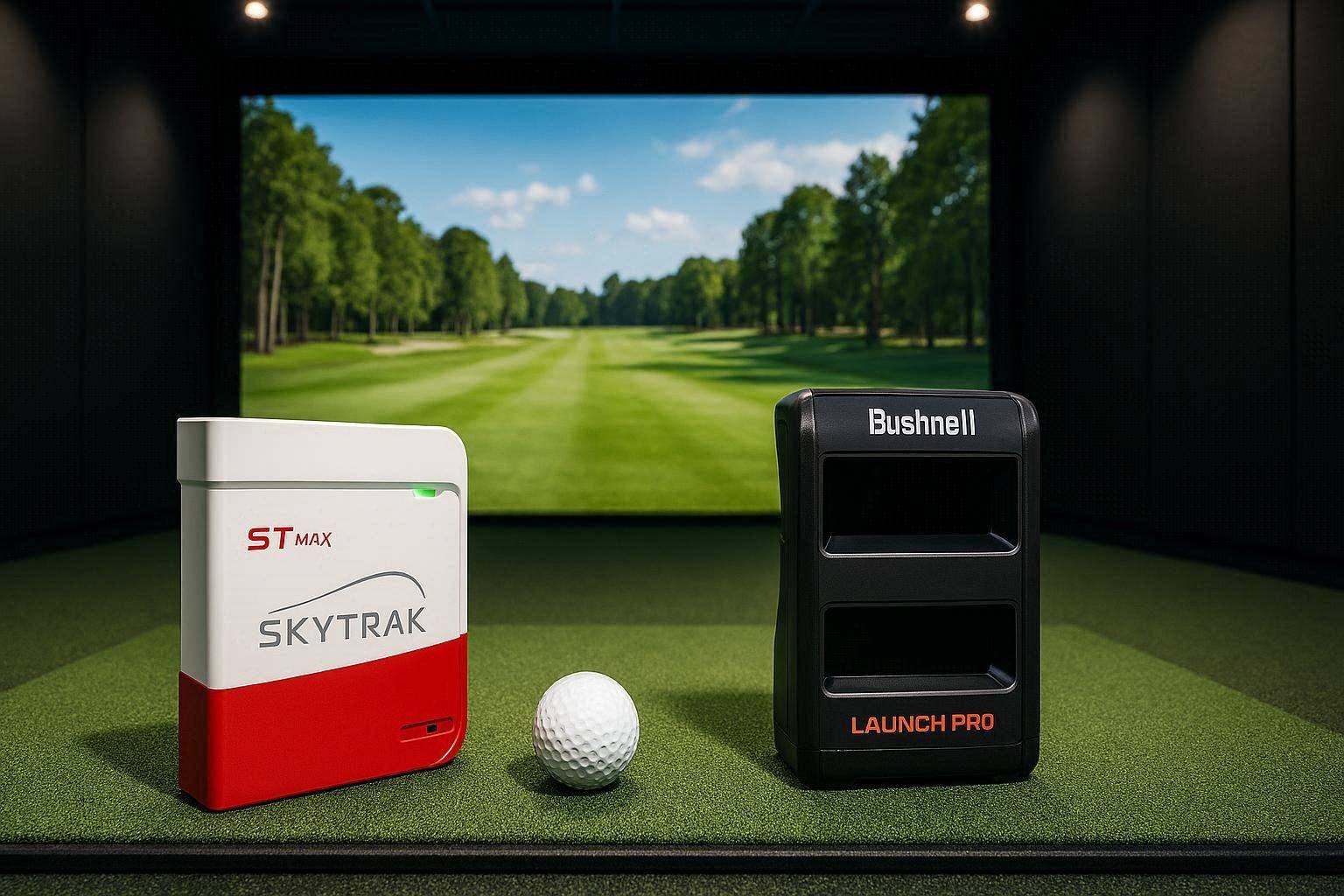
When evaluating a SkyTrak ST Max vs Bushnell Launch Pro for your indoor golf simulator, you are stepping directly into the most competitive price bracket in golf technology. Recent industry price shifts have fundamentally altered this matchup.
Bushnell recently adjusted the entry pricing of its Launch Pro (LPI) to $1,999, while SkyTrak repositioned the ST Max at $1,999. Suddenly, two fundamentally different tracking philosophies are fighting head-to-head at the exact same sticker price.
Choosing between a SkyTrak ST Max vs Bushnell Launch Pro requires looking beyond initial hardware costs. You must evaluate long-term subscription gates, raw tracking technology, hitting space parameters, and software integration with platforms like GSPro.
The “Quick Answer” / Key Takeaways Box
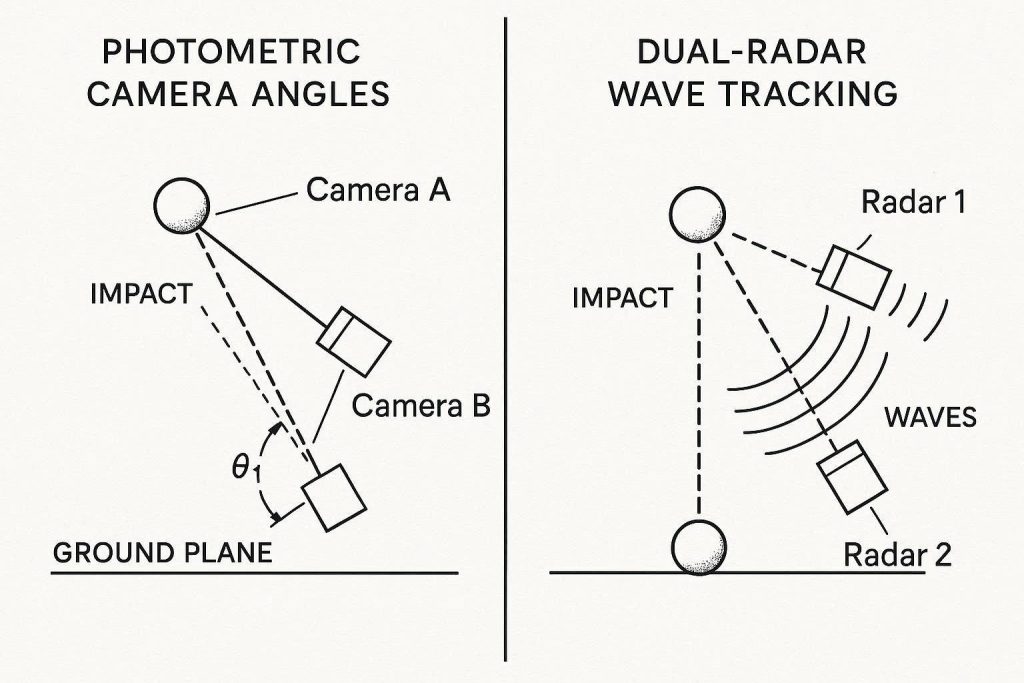
- The Technology Divide: The Bushnell Launch Pro utilizes a triscopic photometric (camera) system built on Foresight Sports architecture, delivering Tour-grade ball data. The SkyTrak ST Max employs a hybrid system combining high-speed cameras with dual radar tracking to measure both ball and club metrics without stickers.
- The Hidden Subscription Trap: Bushnell requires ongoing annual software subscriptions (Silver or Gold tiers) to unlock third-party software integration like GSPro and output full club data, significantly increasing its 3-year cost of ownership. SkyTrak offers essential data streaming with minimal recurring fees.
- Club Data Accuracy: Bushnell measures club head performance with extreme precision using optical fiducial markers. The ST Max estimates or measures club path and face angle via radar, providing solid game-improvement data but missing direct angle-of-attack measurement.
- Space Requirements: Both units operate comfortably in tight garage setups because they are floor-mounted photometric/hybrid devices placed adjacent to the ball, eliminating the massive 16-foot depth requirement of pure flight-tracking radar.
- The Market Disruptor: The $1,599 Square Omni has emerged as a disruptive contender in this category, offering quad-camera photometric tracking with full club data and zero mandatory subscription fees to reach GSPro.
The $2,000 Price Shift: SkyTrak ST Max vs Bushnell Launch Pro Breakdown
Understanding the value proposition of a SkyTrak ST Max vs Bushnell Launch Pro begins with analyzing how these two devices capture a golf shot. While both sit on the turf next to your hitting mat, their internal engineering could not be more different.
The Bushnell Launch Pro is essentially a rebadged Foresight Sports GC3. It houses three high-speed photometric cameras that fire synchronized infrared flashes at the exact microsecond of impact. It takes hundreds of high-resolution images of the ball’s dimple pattern and markings over the first few inches of movement.
By measuring physical pixel displacement across consecutive frames, the Launch Pro directly calculates ball speed, launch angle, side angle, backspin, sidespin, and total spin axis with absolute mathematical certainty. It does not guess, estimate, or extrapolate ball flight algorithms.
In contrast, the SkyTrak ST Max represents an evolution of SkyTrak’s original single-camera design. SkyTrak upgraded the unit into a dual-engine architecture. It combines a high-speed camera array with a multi-frequency radar system.
The camera captures initial ball launch parameters, while the radar module tracks clubhead motion approaching and leaving the hitting zone. This hybrid configuration allows the ST Max to deliver club path, face angle, and clubhead speed without requiring physical reflective stickers on your clubface.
Photometric vs. Dual Radar: How Tracking Technology Impacts Your Swing
The fundamental debate in any SkyTrak ST Max vs Bushnell Launch Pro comparison comes down to camera technology versus hybrid radar integration. Each measurement methodology exhibits unique strengths and operational limitations depending on your environment.
Photometric systems thrive in confined indoor spaces. Because the Bushnell Launch Pro captures ball data within a tiny 7-inch focal zone right at impact, it is entirely immune to ambient room conditions. It does not care if your garage has low ceilings, metal shelving, concrete walls, or spinning ceiling fans.
The cameras capture high-resolution images before the ball even leaves the mat. This results in virtually zero misreads or dropped shots, regardless of how fast or hard you hit the ball.
However, radar technology—even when augmented by cameras like in the ST Max—interacts directly with the physical environment. Radar sensors emit electromagnetic waves that reflect off moving objects. High-frequency indoor lighting, metal garage doors, or high-speed floor fans can create radio frequency interference, leading to occasional misreads or delayed data processing.
Understanding Club Metrics Without Fiducials
Where the SkyTrak ST Max attempts to differentiate itself is in convenience. To measure clubhead data on the Bushnell Launch Pro, you must manually apply reflective fiducial dots to the face of every club in your bag.
Without these dots, the Launch Pro’s optical cameras cannot differentiate the metallic leading edge of the clubhead from the background. The ST Max’s radar array senses the metallic mass of the clubhead automatically.
While skipping club stickers is convenient, radar-based club metrics come with trade-offs:
- Club Path: Accurately tracked by the ST Max’s radar array as the club sweeps through the zone.
- Face Angle: Estimated based on the relationship between initial ball start direction and detected club movement.
- Angle of Attack: Not directly measured by the ST Max; the software calculates an estimated value based on launch angle algorithms.
- Smash Factor: Calculated by dividing ball speed by radar-detected clubhead speed.
If your primary goal is swing reconstruction and fixing a deep-rooted slice or hook, the direct optical measurement provided by the Bushnell Launch Pro with club dots remains the gold standard. If you want quick, friction-free practice where you can grab any club out of your bag without applying stickers, the ST Max offers a far more user-friendly workflow.
The 3-Year Ownership Math: Uncovering Hidden Subscription Gates
The most brutal truth in the SkyTrak ST Max vs Bushnell Launch Pro debate is that sticker price represents only a fraction of your true financial investment. When comparing these units, looking solely at the $1,999 hardware cost is a major financial mistake.
Bushnell operates on a tiered “pay-as-you-go” software subscription structure. Out of the box without an active plan, the Launch Pro functions merely as a standalone practice monitor, outputting basic ball data on its top-mounted LCD screen.
To connect the Bushnell Launch Pro to third-party simulation software like GSPro or to unlock native Foresight software (FSX Play / FSX 2020), you must purchase an ongoing subscription plan.
Bushnell Launch Pro Tier Structure
- Basic / Ball Data Only ($0/yr): Displays ball speed, launch angle, spin rate, and carry distance directly on the physical device screen. No PC connection or third-party software integration permitted.
- Silver Tier ($199/yr): Unlocks basic simulation features, multi-display connectivity, and third-party software connector access.
- Gold Tier ($499/yr): Unlocks full club head data metrics, full FSX Play course libraries, and full third-party integration pass-through.
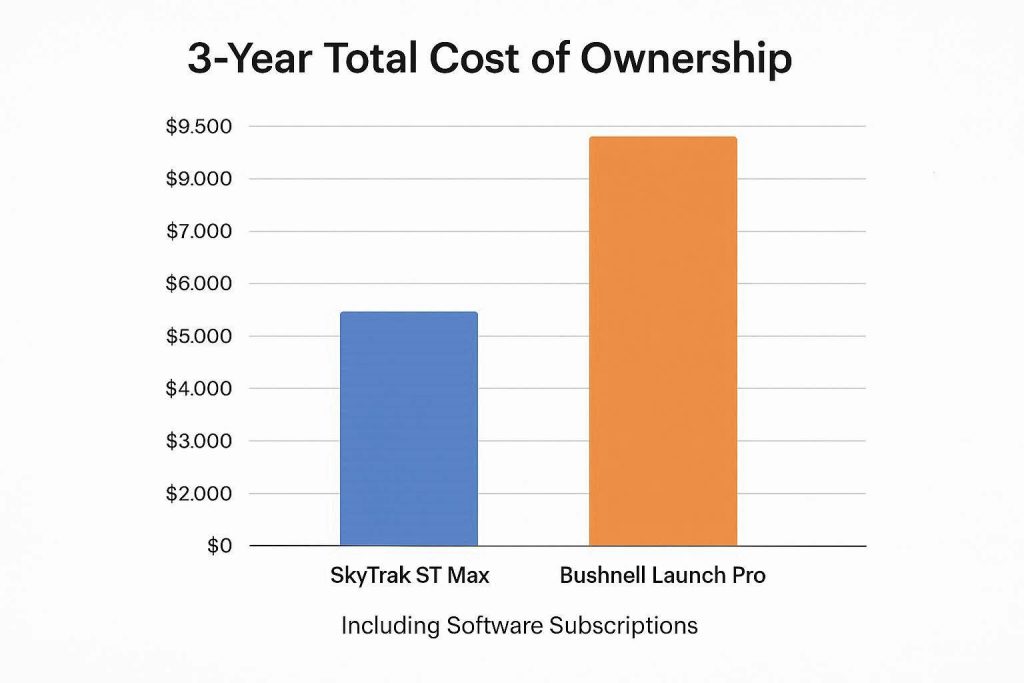
When you factor in the $250 annual license fee for GSPro (which virtually every serious simulator owner uses), running a Bushnell Launch Pro with full club metrics over three years costs:
$$\text{Total Cost} = \$1,999 \text{ (Hardware)} + \$1,497 \text{ (3 Yrs Gold Subscription)} + \$750 \text{ (3 Yrs GSPro)} = \$4,246$$
Conversely, SkyTrak handles software access with far lower recurring friction. The ST Max permits basic open-API communication for third-party software integration under lower subscription tiers.
SkyTrak ST Max Tier Structure
- Basic Plan ($0/yr): Provides a clean driving range experience on the native SkyTrak app.
- Game Improvement Plan ($129/yr): Unlocks advanced bag mapping, wedge distance matrix, environmental controls, and direct integration passes for GSPro and E6 Connect.
Running a SkyTrak ST Max with GSPro over the exact same three-year window calculated above yields:
Total Cost = $1,999 (Hardware) + $387 (3 Yrs SkyTrak Plan) + $750 (3 Yrs GSPro) = $3,136
Over a three-year window, the Bushnell Launch Pro carries a $1,110 premium over the SkyTrak ST Max. You are effectively renting the Launch Pro’s optical precision over the life of the machine.
GSPro Integration and Software Ecosystem Compatibility
For modern indoor golf simulation, the hardware unit is only half the equation. The rendering software dictates your visual realism, physics accuracy, and online tournament play. GSPro has established itself as the dominant open-architecture golf simulator software in the industry.
Connecting the SkyTrak ST Max vs Bushnell Launch Pro to GSPro involves two entirely different software handshake protocols.
SkyTrak ST Max to GSPro Workflow
Connecting the ST Max to GSPro is a streamlined process. SkyTrak provides an official or open-community API connector that routes shot telemetry directly into the GSPro interface over local Wi-Fi or USB.
- Latency: Shot processing takes roughly 1.5 to 2.0 seconds from ball impact to visual flight rendering on the screen.
- Putting: The ST Max handles putting via its photometric lens, though dark-colored putter heads or glossy shaft reflections can occasionally drop a putt read.
- Feeds: Ball speed, launch angle, spin axis, and radar club path transfer seamlessly into the GSPro physics engine.
Bushnell Launch Pro to GSPro Workflow
Because Foresight/Bushnell protects its proprietary software ecosystem, connecting the Launch Pro to GSPro historically required running an official third-party connector or an open-source community bridge (such as the OpenAPI bridge).
- Latency: Near-instantaneous. Shot flight renders on screen in under 0.8 seconds after impact, providing an ultra-responsive experience.
- Putting: Exceptionally precise. The triscopic optical camera tracks slow ball roll and immediate start-line deviation with pinpoint accuracy.
- Feeds: Raw ball rotation vectors pass directly into GSPro without smoothing or software manipulation.
If minimal shot-to-render latency and flawless putting accuracy are your top priorities, the Bushnell Launch Pro’s optical engine delivers a superior experience on GSPro, provided you maintain the required subscription tier.
The $1,599 Disruptor: Why the Square Omni Is Shaking Up the $2K Market
You cannot thoroughly evaluate a SkyTrak ST Max vs Bushnell Launch Pro without acknowledging the massive market disruption caused by new photometric entries—most notably the Square Omni.
Priced aggressively at $1,599, the Square Omni has fundamentally altered the conversation for golfers shopping in the $1,500 to $2,000 range. It directly addresses the primary weaknesses of both the SkyTrak and Bushnell ecosystems.
The Square Omni is an open-access photometric unit utilizing a four-camera system. It measures complete ball data and direct clubhead data without requiring physical club dots or recurring mandatory subscriptions to access GSPro.
| Feature / Metric | SkyTrak ST Max | Bushnell Launch Pro | Square Omni |
| Base Hardware Price | $1,999 | $1,999 | $1,599 |
| Tracking Engine | Camera + Dual Radar | Triscopic Photometric | Quad Photometric |
| Club Data Method | Radar (No Dots) | Optical (Requires Dots) | Optical (No Dots Required) |
| Angle of Attack | Estimated | Directly Measured | Directly Measured |
| GSPro Subscription Gate | $129/year | $199 – $499/year | $0 (Base GSPro Fee Only) |
| Putting Accuracy | Good | Elite | Excellent |
| Portability | High (Internal Battery) | High (Built-in Display) | High (Compact Footprint) |
For golfers who refuse to pay annual subscription fees just to unlock hardware data they already paid for, the Square Omni represents a major alternative. It delivers pure optical tracking at a price point that undercuts both the ST Max and the Launch Pro.
Similarly, for golfers with slightly higher budgets, tethered units like the Uneekor Eye Mini Lite ($2,749) present another compelling alternative. The Eye Mini Lite provides raw photometric club and ball data via high-speed optical cameras with zero recurring data subscription gates.
Premium Upgrades for $2K Launch Monitors: Optimizing Your Garage Studio
To extract maximum performance from either a SkyTrak ST Max or a Bushnell Launch Pro, your physical hitting bay environment must be optimized to eliminate environmental noise and signal degradation. Rushed setups lead to misreads, inaccurate spin calculations, and premature hardware wear.
1. Eliminating Turf Light Reflections
Photometric cameras and radar modules are highly sensitive to infrared light bleed. If you use cheap, high-gloss synthetic turf on your hitting mat, the intense flash of the Bushnell or the radar waves of the SkyTrak can bounce off the shiny plastic fibers, creating visual artifacts.
Upgrading your hitting area with a premium, non-directional turf mat—such as the Fiberbuilt Grass Series or Cimarron Ultimate Mat—absorbs excess light and vibration. You can source these pro-tier mats directly through specialized simulator distributors via PartnerStack or Impact network partners, ensuring your launch monitor receives a clean, reflection-free impact zone.
2. High-DPI USB Extension and Network Isolation
If you choose to run your launch monitor via a wired connection to your gaming PC, standard consumer USB cables will drop data packets over distances greater than 10 feet.
You must utilize an Active Powered USB 3.0 Extension Cable or a dedicated Cat6 Ethernet extender. This guarantees that raw camera frames from the Bushnell or radar telemetry from the SkyTrak stream into your computer’s motherboard without buffer underruns or latency spikes.
3. Dedicated Enclosure Lighting and Lighting Temperature
Avoid installing standard fluorescent bulbs or cheap dimmable LED fixtures directly above your hitting mat. High-frequency flicker from unshielded LED drivers can blind high-speed photometric cameras during exposure micro-intervals.
Install high-CRI (Color Rendering Index) spotlighting positioned behind the launch monitor’s field of view, cast at a 45-degree angle toward the hitting mat. This illuminates the ball clean against the background without shining directly into the optical lenses.
Read the official Microsoft guidelines on configuring high-speed USB device data pipelines here.
Space Requirements, Turf Reflection, and Indoor Swing Syndrome
One major advantage both the SkyTrak ST Max and Bushnell Launch Pro hold over pure radar units (like the Garmin Approach R10 or FlightScope Mevo+) is their compact spatial footprint.
Pure radar units sit 7 to 8 feet behind the golfer and require 8 to 10 feet of ball flight to the net, demanding a total room depth of at least 16 to 18 feet.
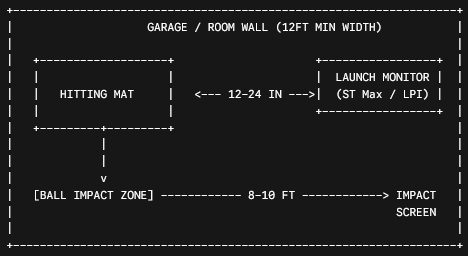
Because both the ST Max and Launch Pro are floor-mounted units positioned roughly 12 to 24 inches directly in front of the golfer’s toes, room depth requirements are governed entirely by your physical swing, not the tracking hardware.
Minimum Recommended Room Dimensions
- Room Width: 10 feet minimum (12 to 14 feet recommended for centered hitting).
- Room Depth: 10 feet minimum (8 feet from tee to screen, 2 feet of space behind the golfer).
- Ceiling Height: 9 feet minimum (10 feet recommended for unrestricted driver swings).
Conquering Indoor Swing Syndrome
Indoor Swing Syndrome occurs when a golfer subconsciously alters their natural swing plane due to fear of striking a wall, ceiling, or expensive launch monitor with their club.
Because the Bushnell Launch Pro and SkyTrak ST Max sit close to the ball path, first-time users often worry about hitting the unit on an extreme shank.
Investing in a dedicated polycarbonate protective shield (available from third-party accessory manufacturers) removes this mental block. Knowing your $2,000 investment is shielded behind bulletproof acrylic lets you swing freely, ensuring your indoor telemetry reflects your true outdoor golf swing.
[INTERNAL LINK: Check out our complete guide to building a custom PC for GSPro 4K rendering.]
Final Verdict: Which Launch Monitor Belongs in Your Hitting Bay?
Choosing between the SkyTrak ST Max vs Bushnell Launch Pro ultimately comes down to a clear choice between optical precision and long-term value.
Choose the Bushnell Launch Pro If:
- You demand absolute, uncompromising ball data accuracy that mirrors tour-level launch monitors.
- You are willing to apply fiducial dots to your clubheads to directly measure true optical club parameters, including Angle of Attack.
- You do not mind paying an ongoing annual subscription fee to access simulation software and maintain complete hardware functionality.
- You want near-zero shot latency when playing GSPro.
Choose the SkyTrak ST Max If:
- You want direct club path and face data without the hassle of applying reflective stickers to every club in your bag.
- You want to minimize long-term software costs over a 3-to-5-year ownership window.
- You prefer an all-in-one practice suite that offers structured wedge matrices, bag mapping, and target challenges out of the box.
- You want a flexible hybrid system that works equally well indoors and at an outdoor driving range.
Both devices are exceptional pieces of golf technology. Match your purchase to your long-term budget, your willingness to pay recurring software fees, and your specific swing diagnostic needs.
Preventative Maintenance & Setup Quick-Action Checklist
To keep your SkyTrak ST Max or Bushnell Launch Pro delivering tour-grade telemetry without misreads or software disconnects, execute this 30-day maintenance checklist:
- Clean the Optical Lenses: Use a soft, non-abrasive microfiber cloth and specialized camera lens cleaner to wipe down the front glass apertures. Dust, turf particles, and grass juice will degrade optical camera clarity.
- Audit Turf Wear: Inspect your hitting mat for dips, depressions, or fraying artificial grass in the hitting zone. An uneven hitting surface alters the ball height relative to the launch monitor’s optical field of view, causing launch angle misreads.
- Verify Lighting Alignment: Ensure no overhead spotlights are pointing directly into the receiving lenses of the unit. Recalibrate ambient lighting to maintain even contrast across the ball.
- Check Battery Health: If running wirelessly, cycle the internal lithium-ion battery completely once a month. Avoid leaving the unit plugged into a continuous trickle charger indefinitely to preserve battery cell longevity.
- Update Firmware: Check the native Bushnell or SkyTrak desktop applications for firmware patches before starting a major tournament round on GSPro. Firmware updates frequently optimize camera exposure algorithms and open-API connection stability.