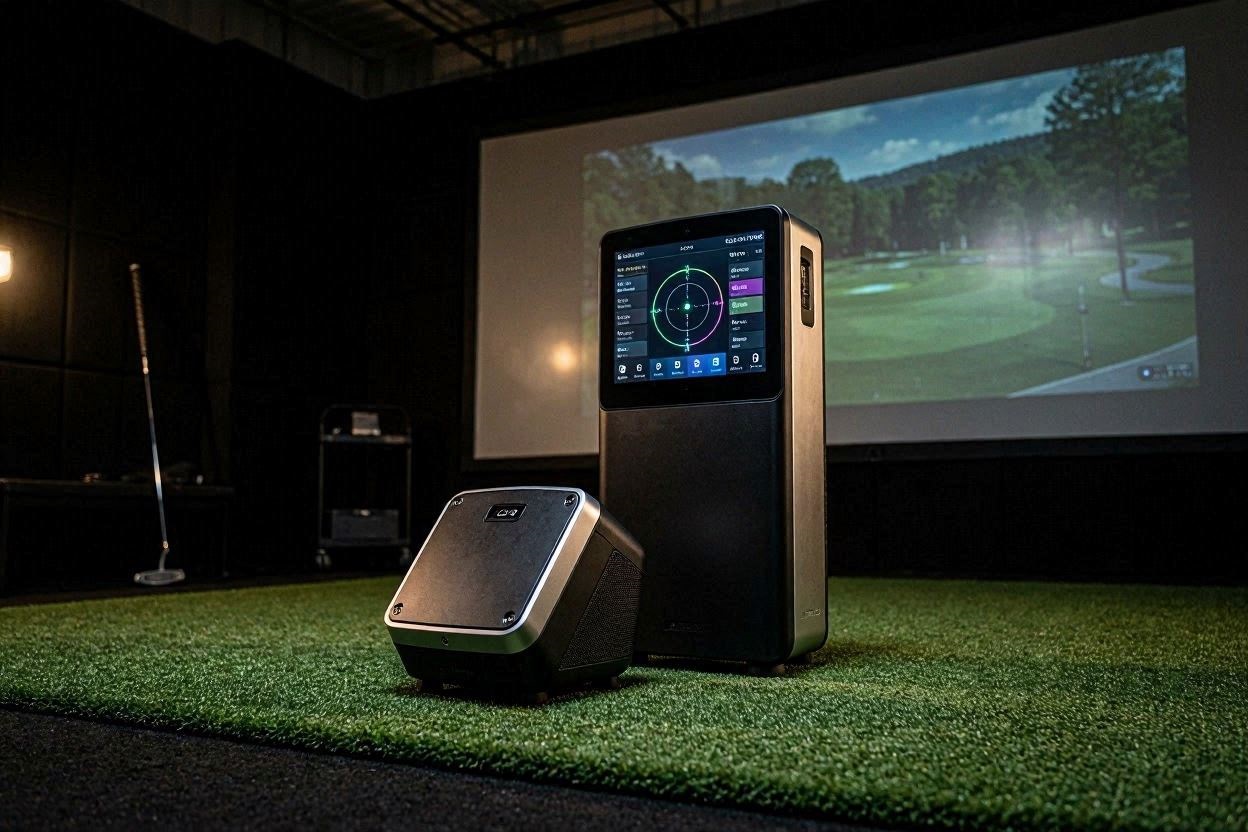
When building a high-end indoor golf simulator, the choice of tracking hardware dictates the entire structural layout of your room. In the mid-to-high pricing tier, the most heavily debated decision among serious golfers is whether to invest in the GC3 or Garmin R50. Both units are photometric ground-based systems, meaning they sit on the floor next to the golf ball and utilize high-speed cameras to capture data.
However, their engineering philosophies could not be more different. The Foresight Sports GC3 is a stripped-down, hyper-accurate data extraction tool designed purely to feed numbers to a computer. The Garmin Approach R50 is a massive, all-in-one console featuring a built-in 10-inch touchscreen designed to bypass the need for a PC entirely. If your primary goal is to run GSPro on a dedicated gaming computer while extracting flawless club data, choosing between the GC3 or Garmin R50 requires a deep dive into data latency, camera shutter technology, and algorithmic accuracy.
The “Quick Answer” / Key Takeaways
- Sensor Architecture: Both units utilize a 3-camera high-speed photometric array. The GC3 focuses purely on data extraction, while the R50 splits processing power to run an onboard display.
- GSPro Connectivity: The GC3 offers a stable, hardwired ethernet/USB connection for zero-latency GSPro rendering. The R50 relies heavily on wireless protocols to connect to third-party software.
- Visual Replay vs Data Purity: The R50 captures and displays a slow-motion impact video of your club striking the ball. The GC3 does not offer native impact video playback but provides superior algorithmic accuracy for club path and angle of attack.
- Physical Footprint: The R50 is exceptionally large (16.5″ tall) and weighs 9 lbs, making it top-heavy. The GC3 is a dense, highly durable, and compact block.
- Club Data Tracking: Both require reflective stickers on the clubface. The GC3 remains the industry gold standard for indoor club data accuracy, while the R50 can occasionally struggle to map steep angles of attack.
Core Sensor Architecture and Camera Shutter Technology
To accurately benchmark the GC3 or Garmin R50, you must look directly at the optical lenses housed behind their protective glass. Both launch monitors are classified as triscopic photometric systems. They capture high-speed, sequential images of the golf ball and the club head as they travel through a localized capture window.
Photometric systems are superior to radar indoors because they do not require 10 to 15 feet of unobstructed ball flight to calculate spin. They measure the exact compression and dimple rotation of the golf ball within the first few inches of movement. However, the internal processors of these machines handle those massive image payloads differently.
[IMAGE PLACEHOLDER: A wireframe diagram showing the field of view for a three-camera photometric launch monitor + Alt Text: Technical field of view diagram for comparing the GC3 or Garmin R50 camera systems]
The Foresight GC3 Triscopic Array
The Foresight Sports GC3 is engineered explicitly for data purity. It utilizes three specialized, high-resolution global shutter cameras paired with a highly calibrated infrared (IR) flash module. Because the GC3 does not feature a large onboard graphic display, 100% of its internal processing power is dedicated to analyzing optical data frames.
This dedicated processing allows the GC3 to instantly detect the ball’s dimple patterns and calculate launch vectors with sub-millimeter precision. The unit measures ball speed, launch angle, side angle, total spin, and spin axis without ever estimating a data point. Its algorithm is practically bulletproof indoors, completely ignoring ambient lighting issues and delivering tour-level metrics instantly.
The Garmin Approach R50 Hybrid Console
The Garmin Approach R50 also employs a three-camera system, but it operates as a fully independent computer. It features a built-in 10-inch color touchscreen display with a resolution of 1280 x 800 pixels. This allows the unit to run Garmin’s native Home Tee Hero simulator software directly on the device, rendering 43,000 global courses without a PC.
While the all-in-one design is revolutionary for casual users, it places an immense thermal and computational load on the R50’s internal hardware. Generating 3D graphics, managing a Wi-Fi connection, and processing high-speed 4K camera frames simultaneously pushes the lithium-ion battery to its limits. Because the hardware is splitting its resources, some technical reviewers note that the R50 can occasionally miss a frame during incredibly high-speed driver swings, leading to slight deviations in raw data compared to dedicated systems.
Which is Better for GSPro? GC3 or Garmin R50
If you already own a dedicated gaming PC, the massive onboard processing features of the R50 lose much of their appeal. GSPro relies on the Unreal Engine to deliver photorealistic graphics, rendering at native 4K resolution. The R50’s internal Home Tee Hero graphics cannot compete with the visual fidelity of a high-end PC running GSPro.
When deciding between the GC3 or Garmin R50 for a GSPro studio, you must evaluate how efficiently the hardware transmits data to the computer. A simulator feels incredibly disconnected if there is a half-second lag between striking the real ball and seeing the digital ball launch on the projection screen.
Comprehensive technical guide on configuring OpenAPI connections for GSPro golf software
Latency and the Data Packet Pipeline
The Foresight GC3 offers highly stable, hardwired connection protocols. You can connect the unit directly to your gaming PC using a high-bandwidth USB-C tether or a dedicated Gigabit Ethernet cable. This creates a closed-loop data pipeline. The moment you strike the ball, the optical data is pushed instantly to the GSPro API, resulting in a zero-latency visual launch.
The Garmin Approach R50 offers HDMI and USB-C ports on the back of the device, but its primary integration with third-party software like GSPro often relies heavily on Wi-Fi bridging protocols. Transmitting high-density data packets over a standard residential Wi-Fi network introduces latency. If your simulator room experiences wireless interference from heavy appliances or neighboring routers, you will experience frustrating delays in shot rendering.
Software Ecosystem Restrictions
Foresight Sports has a long, established history of integrating cleanly with GSPro. The communication handshake between the GC3 and the software is incredibly stable. It functions smoothly for both regular play and complex short-game modules.
The Garmin R50 is relatively new to the market. While it natively advertises compatibility with GSPro, Awesome Golf, and E6 Connect, its integration drivers are still evolving. Early adopters have noted minor bugs when switching player profiles or configuring local multiplayer settings through the R50’s third-party software bridge. If you demand a plug-and-play, bug-free GSPro experience right now, the GC3 has the historical advantage.
Impact Vision Replay vs Raw Algorithmic Accuracy
A major point of contention when evaluating the GC3 or Garmin R50 is the visual feedback loop. Many players are drawn to the Garmin R50 specifically because it captures a slow-motion video of the club striking the ball.
The Value of R50 Impact Vision
The R50 uses its high-speed cameras to record the exact moment of contact, instantly displaying the video replay on its 10-inch touchscreen. This feature provides undeniable diagnostic value. If you constantly hit the ball off the toe or the heel, watching the slow-motion footage provides immediate, undeniable proof of your strike location.
This visual feedback bridges the gap between what a player feels and what actually occurred. You can physically see the clubface twisting open at impact. For visual learners, this replay system is often more valuable than reading a spreadsheet of numbers.
[INTERNAL LINK: Ultimate Guide to Diagnosing Club Path Errors on High-Speed Launch Monitors]
The GC3’s Pure Data Superiority
The Foresight GC3 does not offer native onboard video replay. Instead, it translates the visual data into absolute algorithmic certainty. When comparing the GC3 or Garmin R50, you must ask yourself if you prefer to watch a video of your mistake or receive the exact mathematical degree of your error.
Foresight’s algorithms for calculating club face and path are the most trusted in the indoor simulator industry. It uses a fiducial marker system to track the club’s spatial orientation through the hitting zone with microscopic precision. While the R50’s video replay is fantastic, it is a tool for self-diagnosis. The GC3 provides the exact numbers a professional coach needs to redesign a swing.
Club Data Validation: Fiducials vs Stickers
To capture club delivery metrics (club head speed, path, face angle, and angle of attack), both the GC3 and the Garmin R50 require manual intervention. You cannot simply pull a clean club out of the bag and expect granular data; you must apply reflective markers to the clubface.
The Garmin R50 Sticker Protocol
The Garmin R50 ships with a pack of 250 club tracking stickers. You apply a single reflective sticker high on the toe of the clubface. The internal cameras track this high-contrast sticker as it moves through the capture window.
While this allows the R50 to map club speed and face-to-path relationships effectively, the system struggles heavily with vertical metrics indoors. In controlled technical benchmarks, the Garmin R50 routinely drops or miscalculates Angle of Attack (AoA) readings on steep iron swings. If the software cannot cleanly map the downward descent of the clubhead, it will estimate the number, leading to frustrating inconsistencies for low-handicap players trying to shallow their swing.
The Foresight Fiducial System
The GC3 utilizes a highly refined fiducial marker system. You can apply a simple 1-dot reflective marker for basic club speed and path data, or you can apply a complex 4-dot configuration to unlock granular impact location and closure rate metrics.
Because the GC3’s processing engine is solely focused on data extraction, it rarely drops a club reading. Its Angle of Attack measurements perfectly mirror high-end radar systems, ensuring your smash factor and dynamic loft calculations are absolutely pristine. If you require flawless, tour-grade club data to dial in your driver shafts, the GC3 is the undisputed winner.
Physical Footprint, Weight, and Enclosure Placement
A frequently overlooked aspect of the GC3 or Garmin R50 debate is their physical presence on your hitting mat. Ground-based systems must sit 14 to 18 inches away from the golf ball, placing them dangerously close to the swing path of an erratic golfer.
The R50’s Massive Form Factor
The Garmin R50 is an absolute behemoth. It measures 16.5 inches tall, 10.6 inches wide, and 7.5 inches deep. Because of the large touchscreen and internal battery banks, it weighs a hefty 9 pounds.
This tall, top-heavy design presents a logistical issue on a simulator mat. It commands a massive visual footprint in your peripheral vision while swinging. Furthermore, its height makes it an easy target for a catastrophic shank. If a rogue golf ball traveling at 150 mph strikes the exposed 10-inch glass touchscreen, the repair bill will be devastating.
The GC3’s Ruggedized Chassis
In stark contrast, the Foresight GC3 is built like a dense, ruggedized brick. It maintains a low center of gravity and features a thick polycarbonate and aluminum housing. It weighs only 5 pounds, yet it feels incredibly durable.
Because it lacks an exposed glass touchscreen, it can survive minor glancing blows and ambient room hazards much better than the R50. It sits quietly on the mat, reading data without commanding attention. For a dedicated GSPro studio where the player is looking at the impact screen rather than the launch monitor, the GC3’s minimalist footprint is vastly superior.
The Premium Upgrade: Bulletproofing Your Hardware Infrastructure
If you are investing upwards of $5,000 to determine whether the GC3 or Garmin R50 is right for your bay, pairing either unit with cheap retail accessories will ruin your tracking accuracy. You must upgrade your surrounding enclosure to commercial-grade standards to protect your investment and optimize data capture.
Sourcing Strike-Forgiving Stance Mats
Ground-based launch monitors stare directly at the interaction between the clubhead and the turf. If you purchase a cheap, rigid nylon driving range mat from a generic online retailer, your clubhead will bounce artificially off the hard concrete subfloor.
This harsh deflection completely ruins Angle of Attack data on both the GC3 and the R50. To guarantee pristine club metrics, you must source a premium, multi-layer stance mat from specialized engineering brands. Utilize high-end B2B networks like ShareASale or Impact to purchase modular hitting inserts from companies like Fiberbuilt or Carl’s Place. These commercial mats feature deep-pile synthetic channels that allow the iron head to slide down and through the ball naturally, perfectly replicating real grass compression and ensuring your indoor numbers match your outdoor reality.
Heavy-Duty Impact Screens and Enclosures
An erratic shank that misses your screen and strikes your Garmin R50 touchscreen will destroy the unit instantly. You must contain the hitting zone utilizing a heavy-duty architectural enclosure.
Source an enclosure frame built from thick aluminum extrusion or heavy-wall steel piping. Wrap the frame entirely in high-density acoustic foam padding. Your impact screen must be woven from premium, multi-layer polyester fibers designed to absorb high-velocity kinetic energy without extreme rebounding. Secure these high-ticket components through dedicated affiliate networks rather than consumer storefronts to ensure you receive professional-grade manufacturing warranties and customer support.
Custom Setup Hack: The Zero-Axis Alignment Checklist
Both the GC3 and the Garmin R50 require absolute physical alignment to function correctly. If the hardware chassis is rotated by even half a degree, the internal algorithms will push your digital golf ball offline. Do not rely entirely on the visual alignment aids displayed on the R50 screen or the basic alignment stick procedures of the GC3. Execute this physical hack to guarantee perfect tracking.
- Obtain a high-powered, self-leveling cross-line laser tool.
- Place the laser directly on your hitting mat and project a bright green line straight from your tee position to the exact center of your impact screen.
- This laser line represents your absolute digital target axis.
- Place your launch monitor exactly 14 inches parallel to this laser line.
- Lay a rigid metal straight-edge ruler flat against the front face of the launch monitor housing.
- Using a secondary laser or a carpenter’s square, verify that the straight-edge is perfectly parallel to your floor laser line.
- Finally, place a digital machinist’s inclinometer on top of the launch monitor chassis to confirm it is sitting at a perfect 0.0-degree level.
By mechanically locking down the physical geometry of your launch monitor before you ever turn on the software, you instantly eliminate horizontal drift, ensuring that every push, pull, or dead-straight shot displayed in GSPro is a true reflection of your actual golf swing.